# Keyboard Shortcuts

We've expanded the number of actions available for keyboard shortcuts, giving you more control than ever before.

* Re-assignable Shortcuts: Most shortcuts can be customized, while some remain fixed.
* Dual Key Combos: Certain actions support two different key combinations for added flexibility.
* Import/Export Mappings: Easily back up or transfer your shortcut configurations.
* Categories: Shortcuts are grouped into different categories for better navigation.

{% hint style="info" %}
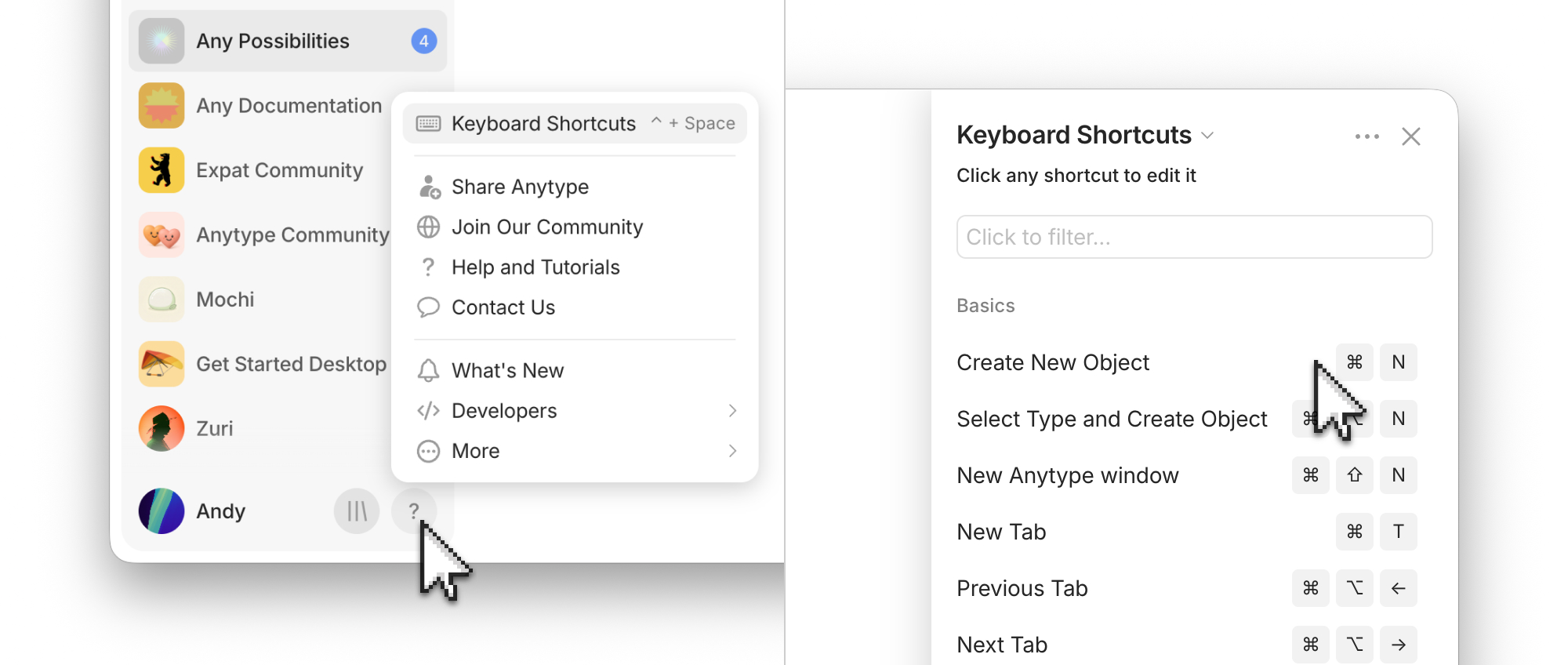
You can check all keyboard shortcuts in the app by clicking on `? > Keyboard shortcuts` in the bottom left corner of the app.
{% endhint %}

<figure><img src="/files/NIOeVV86Ql0Ks97Onfas" alt=""><figcaption></figcaption></figure>


---

# Agent Instructions: Querying This Documentation

If you need additional information that is not directly available in this page, you can query the documentation dynamically by asking a question.

Perform an HTTP GET request on the current page URL with the `ask` query parameter:

```
GET https://doc.anytype.io/anytype-docs/advanced/settings/keyboard-shortcuts.md?ask=<question>
```

The question should be specific, self-contained, and written in natural language.
The response will contain a direct answer to the question and relevant excerpts and sources from the documentation.

Use this mechanism when the answer is not explicitly present in the current page, you need clarification or additional context, or you want to retrieve related documentation sections.
