> For the complete documentation index, see [llms.txt](https://doc.anytype.io/anytype/llms.txt). Markdown versions of documentation pages are available by appending `.md` to page URLs; this page is available as [Markdown](https://doc.anytype.io/anytype/documentation_cn/shu-ju-an-quan/delete-or-reset-your-account.md).
# 数据擦除
由于我们无法访问你的 Anytype 数据,也无法将你的 Anytype ID 与你的电子邮件地址联系起来,因此我们无法删除你的数据。这意味着你需要自行通过应用程序删除数据。
### 删除或重置你的账户
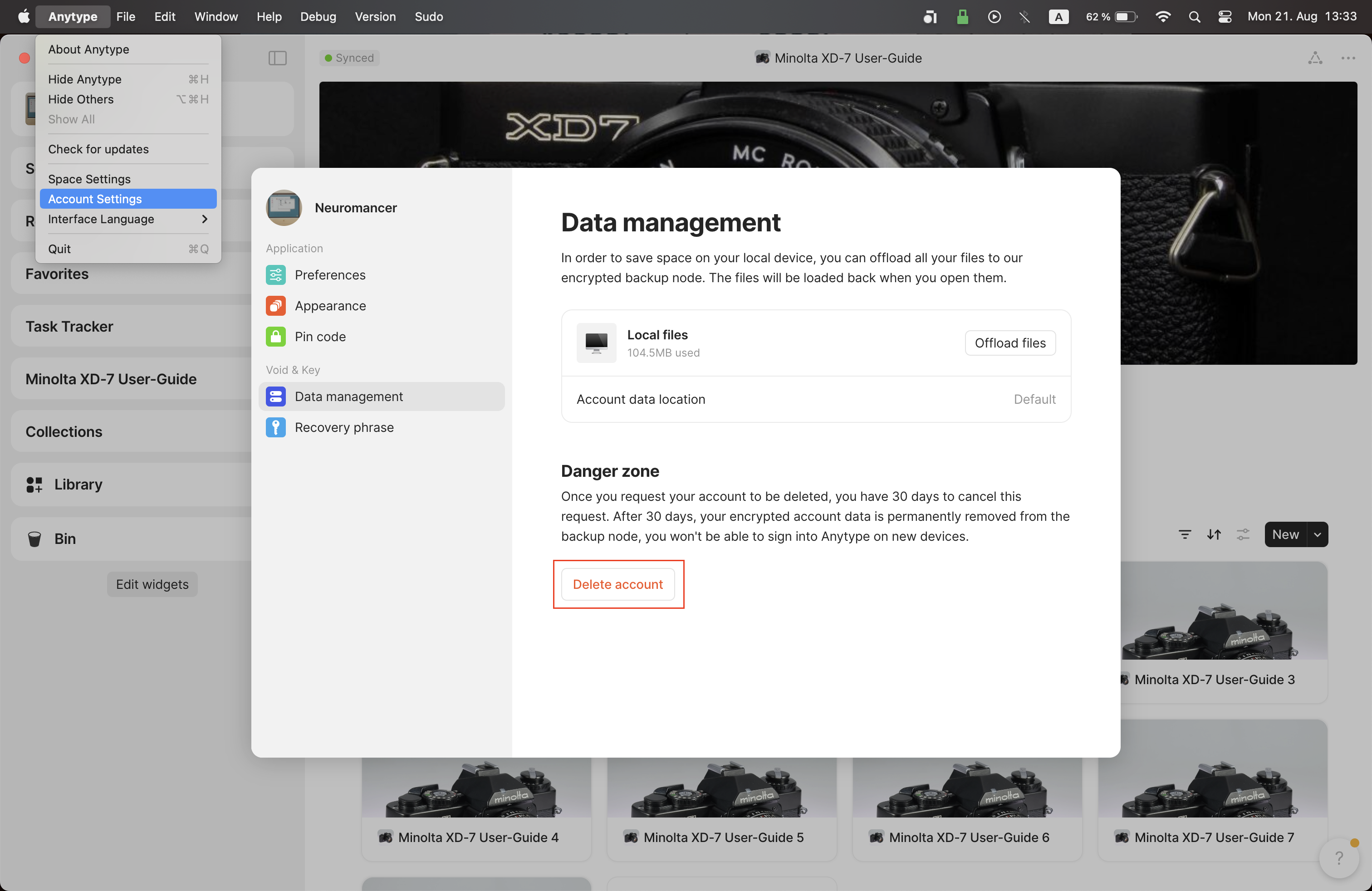
在顶部菜单中点击“Anytype”,打开 设置 > 数据管理,然后选择 **删除账户**。这将会删除你的个人资料和【恢复短语】:
如果你想开始一个新账户,执行以下操作:
1. Anytype > 设置 > 账户 > 数据管理 > 删除账户
2. Anytype > 设置 > 账户 > 登出
3. 点击:“***注册***”(而不是“登录”)
### 其他数据
为了遵守 GDPR,如果你通过 联系我们,我们可以删除其他所有东西(论坛帖子、支持工单和电子邮件订阅)。
---
# Agent Instructions
This documentation is published with GitBook. GitBook is the documentation platform designed so that both humans and AI agents can read, navigate, and reason over technical content effectively. Learn more at gitbook.com.
## Querying This Documentation
If you need additional information that is not directly available in this page, you can query the documentation dynamically by asking a question.
Perform an HTTP GET request on the current page URL with the `ask` query parameter, and the optional `goal` query parameter:
```
GET https://doc.anytype.io/anytype/documentation_cn/shu-ju-an-quan/delete-or-reset-your-account.md?ask=&goal=
```
`ask` is the immediate question: it should be specific, self-contained, and written in natural language.
`goal` is optional and describes the broader end goal you are ultimately trying to accomplish on behalf of the user. GitBook uses it to tailor the answer towards what is most useful for that goal.
The response will contain a direct answer to the question and relevant excerpts and sources from the documentation.
Use this mechanism when the answer is not explicitly present in the current page, you need clarification or additional context, or you want to retrieve related documentation sections.