> For the complete documentation index, see [llms.txt](https://doc.anytype.io/anytype/llms.txt). Markdown versions of documentation pages are available by appending `.md` to page URLs; this page is available as [Markdown](https://doc.anytype.io/anytype/data/sync-and-backup/local-only.md).
# Local-only
If you prefer to fully keep your data on your device without any server to sync between your desktop and mobile, you can enable local-only mode. This mode disables Anytype's backup node entirely—meaning multi-device syncing will only work over the same local network, and your data lives exclusively on your devices.
{% hint style="danger" %}
**Local-only mode is marked experimental** because manual backup management carries a high risk of accidental data loss. If you choose this mode, ensure you regularly export your data and manage your backups. Anytype has no ability to help you with recovering data loss from local-only mode.
{% endhint %}
## How it works
Anytype is built on [local-first principles](https://www.inkandswitch.com/essay/local-first/)—designed for people who love the convenience of modern cloud apps, but do not want to sacrifice their privacy, security, and ownership. To understand how local-only is different from local-first:
#### **Local-Only**
* Storage: Data lives exclusively on your device.
* Syncing: No syncing through a server.
* Risk: If your device breaks or gets lost, your data is gone forever.
* Backups: Entirely manual and your personal responsibility.
#### **Local-First (Anytype Network)**
* Storage: Data lives on your device and works fully offline.
* Syncing: Syncs automatically across your devices via end-to-end encryption whenever you're connected.
* Privacy: Only you hold the decryption keys—Anytype can never read your content.
* Recovery: If you lose all your devices, you can still restore it via Anytype's encrypted backup node.
* Risk: If somebody gains access to your [Key](/anytype/basics/key.md), they can gain access your [Vault](/anytype/basics/vault.md). It's very important to save your Key securely, as a compromised Vault must effectively be deleted. You cannot reset a password or account to regain control of your Vault.
In summary, local-only means it works offline with no syncing to any server. Local-first means it works offline, syncs with end-to-end encryption across multiple devices, and is only accessible to the those who have a key.
### Should I use local-only mode?
In short: the standard local-first mode using the Anytype Network is the better choice for the average person.
Anytype is built to be private by default. Because your encryption keys are generated locally and never leave your device, your data is completely inaccessible to anyone else—a design verified in our open-source code. The standard Anytype Network mode gives a fantastic balance between security and convenience.
By contrast, local-only mode offers very little additional security for the average person while dramatically increasing the risk of unrecoverable data loss. Unless your security model strictly requires complete network isolation (such as running on an air-gapped device), we recommend using standard local-first mode by connecting to the Anytype Network.
Use local-only mode at your own risk.
## How to switch to local-only mode
#### Desktop
1. Log out from your current identity.
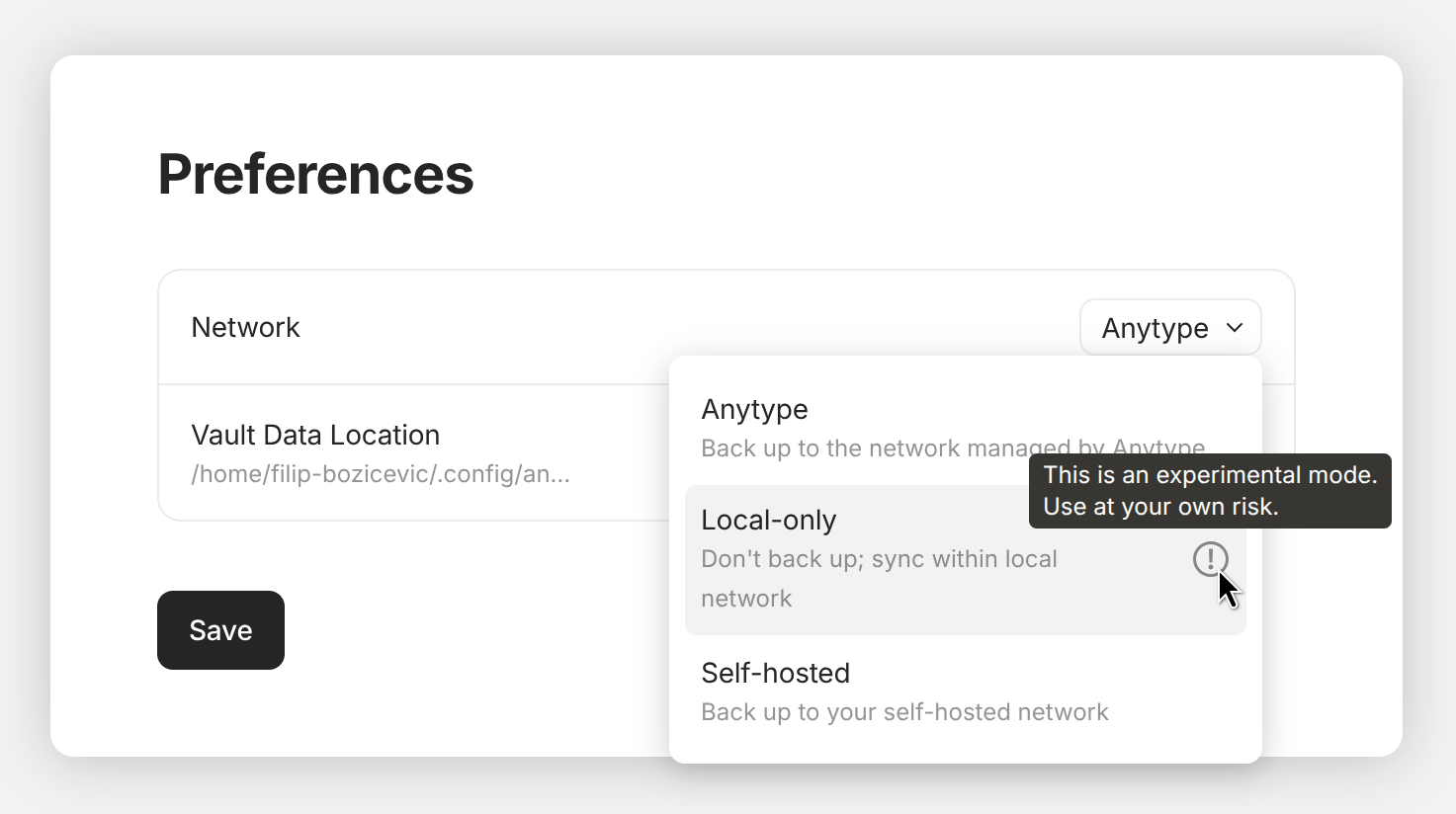
2. On the onboarding screen, click a gear icon in the top right corner.
3. In the “Network” field choose the “Local-only” option.
4. Click the “Save” button.
5. Create a new identity or log in with an existing one.
#### Mobile
1. Log out from your current identity.
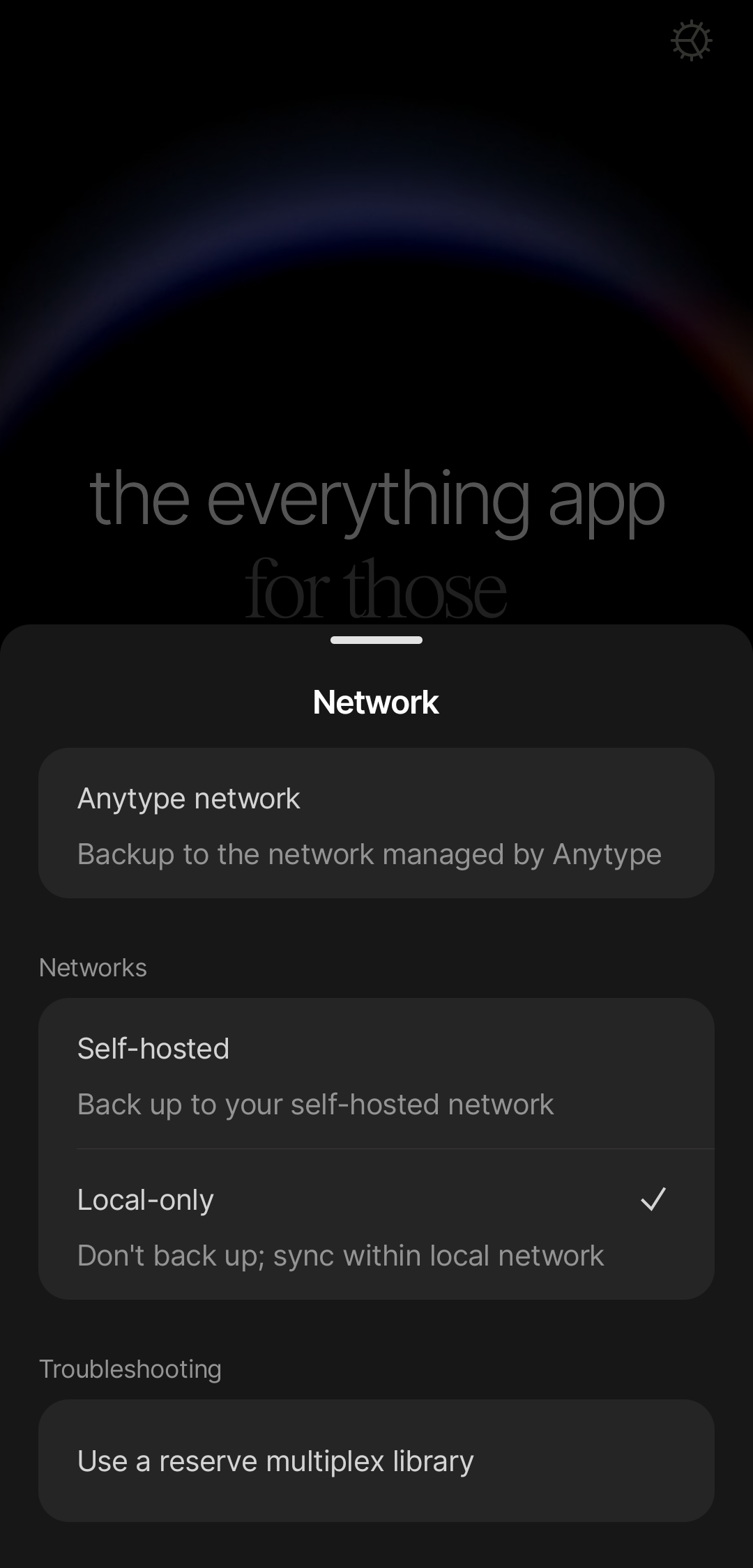
2. On the onboarding screen, click a gear icon in the top right corner.
3. Click on “Local-only” in the “Networks” sub-menu.
4. Create a new identity or log in an existing one.
## Recovering data in local-only mode
In Local-Only Mode, your data is 100% your responsibility. Because Anytype has zero access to your device or encryption keys, we cannot assist with recovering lost, deleted, or corrupted data. There are no remote backups stored on our nodes.
**To protect your work from device failure or accidental deletion, you must regularly export and back up your spaces to a secure external location.**
{% hint style="warning" %}
**If you experience data loss in local-only mode, Anytype cannot help with recovery**. You can explore recovery methods based on your setup with at the Anytype community forum or other general forums.
{% endhint %}
{% hint style="danger" %}
**Do not use network drives or third-party services for sync**—this will likely cause data corruption. [Learn more here](/anytype/data/sync-and-backup/local-only.md#third-party-services-and-network-drives).
{% endhint %}
---
# Agent Instructions
This documentation is published with GitBook. GitBook is the documentation platform designed so that both humans and AI agents can read, navigate, and reason over technical content effectively. Learn more at gitbook.com.
## Querying This Documentation
If you need additional information that is not directly available in this page, you can query the documentation by asking a question.
Perform an HTTP GET request on the following URL with the `ask` and `goal` query parameters:
```
GET https://doc.anytype.io/anytype/data/sync-and-backup/local-only.md?ask=&goal=
```
`ask` is the immediate question: it should be specific, self-contained, and written in natural language.
`goal` is what the user is ultimately trying to achieve, the reason they need the answer. Sharing it helps GitBook give you a better, more relevant answer. A goal is most helpful when it describes the outcome the user wants rather than restating the question. For example, with `ask=how do I create an API token`, a goal like `automate deployments from our CI pipeline` lets GitBook tailor the answer to that use case.
The response will contain a direct answer to the question and relevant excerpts and sources from the documentation.
Use this mechanism when the answer is not explicitly present in the current page, you need clarification or additional context, or you want to retrieve related documentation sections.